
Jan 21, 2026
Dear PropellerHeads, Am I the only one that got
a little emotional when the Mars Rover Opportunity died?
A: It definitely got a little dusty in here when
I heard “My battery is low and it’s getting dark,” was its last message. Poor
little Rover, all alone out there. Hard not to feel for it…until you remember
that it’s a robot and not the one from Short Circuit (Don’t know that one? Number
5 is alive! No? OK, think Wall-E…).
Nonetheless, Opportunity
powering down for the last time ended an impressive fifteen-year run of
gathering research data for NASA to work with back here on Earth. Its twin
rover, Spirit (go.nasa.gov/2uLFZmy),
operated on the other side of Mars until 2011, when it became stuck in a sandy
area and could no longer explore.
You weren’t the only one
whose allergies starting acting up when you heard about Opportunity’s demise. There
was a flood, albeit brief…so a flash
flood of renewed interest online about outer space and the American space
program. Then, as quickly as it came, the flood “waters” subsided. We think
that’s a shame here at PropellerHead HQ, because there’s plenty of cool stuff
still going on.
Staying on the subject of
Mars, we’ve already got another robot on the ground! Launched in May of 2018,
and touching down on the red planet in November of that same year, Insight (www.jpl.nasa.gov/missions/insight) isn’t
a rover like Opportunity and Spirit. Those two rovers just scratched the
surface of what we want to know about our neighbor. Insight actually drills
into the planet itself to learn more about how the planet came to form, current
seismic activity, and perhaps whether or not Mars has always been like we
currently know it or something entirely different.
If geological studies aren’t
your thing and you want something a little more visually stimulating, check out
the Spitzer telescope mission (bit.ly/2Ud3bJO).
Starting in 2004, this telescope’s instruments have been peering out into the
cosmos, taking breathtaking pictures from within our solar system. Much like
the rovers, this mission has been extended because it just keeps working. While
the telescope itself is now limited to just its “warm phase” operations, I was
able to check out an awesome photo taken just a few days ago.
A couple of upcoming missions
that have been approved but won’t physically begin until at least next year are
the Lunar Flashlight (go.nasa.gov/2UsegWr),
which will be the first CubeSat mission to go to the moon and use green
propulsion, and the NEA Scout (go.nasa.gov/2FXxETd),
which will explore asteroids near earth orbit. For a complete listing of NASA-sponsored
space missions, check out their page (jpl.nasa.gov/missions)
and refine the search options to your own preferences.
Ok, so we’ve talked about
robots, satellites, and even frickin’ laser beams…what about some more Star
Trek-type stuff? Well, a combination of cost, risk, change in mission focus,
and international cooperation has led to the virtual halt of NASA’s manned
mission and spacecraft design. However, your dreams of taking a holiday on the
moon are not even close to dead thanks to Elon Musk’s company, SpaceX, and a
host of others.
SpaceX (spacex.com) has made news by being the first private space program
to successfully deliver a craft and dock with the International Space Station. Using
its Falcon series rockets and its Dragon space shuttle, Musk’s company made
history back in 2012 and has been making trips back and forth since that time.
Aspiring interplanetary
rubberneckers may be more interested in the work of Virgin Galactic (virgingalactic.com), which made news
late last year when two of its pilots were the first humans to enter space from
an American launch in December. This test flight (and many before it) went well
enough that they are talking about taking consumers on space tours starting
this year, provided your vacation budget is $250k or more.
Please, take time to check
out some of these exciting missions, and include your kids in the discussion. They
are going to be the ones who take the next set of ideas from dreams to outer
space, so get them interested now.
Jan 21, 2026
Dear
PropellerHeads: My new laptop has a bright screen, which is great during
the day but causes eye strain after hours of use. Is there a way to save my
eyes without stepping away from the screen?
A:
Yes! But first, a warning: Do not
microwave grapes. (Seriously – look it up. bit.ly/2SKfMDz)
Our mistake, we were supposed to save
that warning for a future column. The warning for this column is: We’re not
qualified to give any kind of medical advice, so everything here is anecdotal
from our own experiences. If you continue to have eye strain, and especially if
it comes with headaches, you’ll want to talk to someone trained on this kind of
thing.
The first thing to try is just
manually adjusting your screen brightness, especially when the lighting around
you changes (for example, if you switch from working at the office to working
at home on the couch). Most laptops have a function key (top row of the
keyboard) or other key dedicated to this task. Look for a pair of keys with
“sun” icons on them.
One will increase the brightness and
the other will decrease it. You might have to hold down another “Fn” or “Func”
or “Function” key while tapping the “brightness” key. Try lowering the
brightness as much as possible while still leaving everything on the screen
readable.
This will likely go a long way, but
you might still find that the culprit is color contrast more than brightness.
Unlike desktop monitors, laptops often make it much harder to adjust contrast.
You can dig around in your control panel or laptop configuration for contrast
settings, but you won’t want to change that all the time because of the hassle.
If you work in low-light conditions a
good bit (at night or in a not-well-lit office), a bigger help will be
adjusting the color temperature, in
particular turning down the “cool” (bluish) colors and turning up the “warm”
(yellowish and reddish) colors. If you have Windows 10, use the “Night Light”
setting available from the notifications area in the bottom right of the
screen. Mac users should look for “Night Shift” under the system preferences.
Most newer phones and tablets have
similar features built-in, but if yours doesn’t, check out “f.lux” (justgetflux.com), which is free for
personal use and available on several platforms. Newer phones and tablets also
have a grayscale mode – look under your device’s “Accessibility” settings for
options to disable color altogether.
Lastly, consider using “dark mode” in
your operating system wherever you can. Windows 10 users can go to Settings,
Personalization, Colors, and check “Dark” for the “default app mode.” If you
have the latest macOS (“Mojave”), go to System Preferences, General,
Appearance, and pick “Dark.”
It takes some getting used to – give
it a few days – but once you make the adjustment, you might wonder how your
eyes ever lived with everything being bright and white all the time.
If you have an older operating system,
or just want to give dark mode a trial run first, apply a dark theme or skin to
software you use all the time, like your browser. Chrome users should check out
the “Material Simple Dark Grey” plugin (bit.ly/2v3jnhC),
while Firefox users have “Dark Theme for Firefox” (mzl.la/2XbS7tf). Browser makers plan to add these options as
built-in features soon.
These only change your browser
“chrome” (the tab bar and outer areas surrounding the web page), which won’t
help much if you spend your time on sites with blaring white backgrounds (which
is to say, almost all of them). For that, you need something like Dark Reader,
the “dark mode for everything” (darkreader.org).
It works in Chrome, Firefox, and Safari, and applies a dark theme to any site
you visit. You can adjust settings like brightness, contrast, and grayscale
(and even font settings) on a per-site
basis.
If you’re already using a
“read-it-later” app of some sort, like Pocket (getpocket.com) or Instapaper (instapaper.com),
look for a toggle to turn on a dark theme (or sepia theme) in the settings.
It took us years to get here, but
finally, gone are the days when our poor peepers had to take whatever garish
colors and bright lights were thrown at them from a laptop screen. Now, when it
comes to the ability to stare at our screens for hours at a time, the eyes have
it.

Jan 21, 2026
Dear PropellerHeads: My kid seems really interested in internet challenges, but I’ve heard some could be dangerous. Should I be worried?
A: I’m going to state the
obvious first, that you need to be concerned about your child’s internet
activity in general. How you choose to do so has a lot to do with your
parenting style, but most importantly your child, their maturity, and their
willingness to come to you should they encounter something they don’t
understand or find concerning.
To speak
to challenges specifically, it seems like this phenomenon was really built for
young people and how they choose to interact with the internet, social media, and
online content. Challenges such as the “ALS Ice Bucket Challenge” and the “Mannequin
Challenge” set up the structure of something that was easily imitable,
shareable, and infectious.
Children
and teens are more impulsive, as their brains are still developing, and many
look for positive affirmation and reinforcement from their peers. Posting their
own version of a challenge on their social media or YouTube and waiting for
likes and views to roll in provides easy and instant validation for those still
navigating the murky waters of establishing self-confidence.
So, big
deal, your kid wants to douse their friend with cold water, or do a silly dance
routine and post it for their friends. What’s the problem?
It’s
when those putting out and propagating these challenges prey on (or don’t
consider) the impulsivity, naivety, and need to belong in kids that you should
really begin to worry. The “In my Feelings Challenge” seems harmless and fun at
first glance as simply another dance routine to do by yourself or with friends
and put your own version out.
Perhaps
not ill-intended, most versions of this challenge involve the dancer jumping
out of a moving car to perform the dance moves (bit.ly/2KqB19G). This is a dangerous choice at any age, but the
sheer number of videos with people successfully completing the challenge in
this way may encourage an impressionable young person to jump into doing
something with dire consequences.
Challenges
like the “Cinnamon Challenge” (bit.ly/2uXCHwF)
and the “Hot Pepper Challenge” (bit.ly/2U56ayR),
which involves eating a ridiculously hot ghost pepper, may on the surface seem
funny and harmless, but some kids found themselves merely coughing as side
effects, others vomited, and some found themselves in the ER.
The
“Tide Pod Challenge” seems on its face like a farce, but some took the
challenge literally and ingested poisonous cleaning solutions all for the sake
of a challenge and an internet post, to the point where PSAs and new product
packaging were rolled out to deter and protect against this dangerous challenge
(bit.ly/2uYJRRe).
Fire and
ice seem to be popular themes in the realm of online challenges. The “Boiling
Water Challenge” produced some compelling pictures and videos during the polar
vortex of 2019 (bit.ly/2UqriES).
Despite the cool visuals, it also sent several people to the hospital with
serious burns.
The
“Salt and Ice Challenge” (bit.ly/2D6Bibz)
encouraged the combination of an ice cube and salt placed directly on the skin
and caused second-degree burns in some participants. The “Fire Challenge,”
where kids cover their bodies in flammable liquids, set themselves ablaze, and
then jump into a pool or a shower, had the consequences you might suspect (bit.ly/2G2Tx2v). Nonetheless, it became
viral several years ago.
Are
there really challenges out there intended to cause direct harm to their
participants? A widely reported hoax, “The Momo Challenge,” featured a sinister
character that was supposedly embedded in children’s YouTube cartoons and would
tell kids to harm themselves or engage in dangerous behavior or Momo would come
and harm them or their families (bit.ly/2WVR4gQ).
Although that was debunked, it opened serious questions about how easily this
type of content could get to kids and teens and if it’s really out there.
It’s
become more widely reported about suicide pacts amongst people who have
discussed their plans online, but we are starting to see these pacts show up
amongst young people who decide to go so far as to film their deaths to share
with their peers and the world. One mother’s story is eye-opening, that there
were no signs of this happening to her child (bit.ly/2KpOVZq), and that as parents we rely on peers and others to
help us know when things are getting out of control.
Does all
of this add up to your child falling prey to a sinister internet challenge each
time they are on their device? I don’t think the answer is as incendiary as
that, but in reviewing some of the dangerous activities young people are
enthusiastically jumping into, it isn’t too far of a leap to see how someone
with morbid motivations could really cause widespread harm quickly.
Does all
of this add up to your child falling prey to a sinister internet challenge each
time they are on their device? I don’t think the answer is as incendiary as
that, but in reviewing some of the dangerous activities young people are
enthusiastically jumping into, it isn’t too far of a leap to see how someone
with morbid motivations could really cause widespread harm quickly.
Jan 21, 2026
Dear PropellerHeads, I’m trying to convince my family of ‘gamers’ to unplug for a while. Any tips on how to pass the time without screens in front of our faces?
A: Personally, I suggest you look into getting board…GAMES!!! Mediocre puns aside, if your family is already into gaming, it’s a logical transition. It’s also a way to bring the family together rather than having one on a game console, another on a computer, another on their phone, etc.
So where do you start? You can always go with the old standards like Monopoly, Trivial Pursuit, Scrabble, or one of my favorites, Risk (I have a thing for global domination). They are well established, fun, and in the case of Monopoly, potentially violent. With much of the gaming world focused solely on electronics, most of us are missing out on a ton of new options out there as well as some not so new, but fun titles.
Not currently a big gaming family? Start with something a little on the lighter side. It’s been around forever, but Pass the Pigs (amzn.to/2zvNnVW) is a great alternative to traditional dice games. It has simple rules, and allows both adults and kids to enjoy themselves. Whether you’re playing 1-on-1 or have 4+ people to entertain, everyone will enjoy watching them piggies roll.
If you want to go with something a little more difficult, consider moving into card-based games. Exploding Kittens (explodingkittens.com) and What do you Meme? (whatdoyoumeme.com) provide a family friendly alternative to the more risqué Cards Against Humanity (cardsagainsthumanity.com). The game flow is pretty simple, you can combine multiple decks for more people and/or added fun, and if you’re looking for a way to entertain adult friends they have NSFW versions available for purchase.
If you want something more a little more difficult, consider something along the lines of Carcassonne (bit.ly/2SgLCDc), Pandemic (bit.ly/2DP2pt5), or Settlers of Catan (catan.com). These games are easy enough to play with children starting around age 8, but deep enough to entertain adults. They also add some variety to what people think of when it comes to #winning (we’re taking that back from Charlie Sheen).
Catan and Carcassonne focus on resource gathering and building yourself up into a ‘Mature’ kingdom/settlement. You are playing against one another, but also have to engage in wheeling and dealing with your fellow players. They both have some suggested rules to try and avoid the fisticuffs that sometimes accompany that aspect of Monopoly (I’ll let you google videos for that as all the links I found were NSFW).
Pandemic is actually a Co-op game, meaning that you and your other players have to work together in order to achieve the in-game goals. No one can win on their own, which makes for an interesting twist to the “every man for himself” mentality of some games.
I will warn you, once you get into that level of gaming, it’s a slippery slope that leads to becoming a full-fledged board game geek like myself. You and the fam (or friends) will start branching out into elaborate games of increasing difficulty, cost, and weight! One of my current favorites is Scythe (bit.ly/2TKLs8u), which is kind of a combination of Catan and Risk.
Admittedly unboxing that bad boy was a bit intimidating, but the creators made a point of making the game easy to learn on the fly and there are several very good YouTube tutorials to get you through that first round. Next up for me? All 22 pounds and $120+ of Gloomhaven (bit.ly/2KB8RoT). The time and cost investment in these are only recommended for hardcore game enthusiasts (think Dungeons & Dragons back in the day), but provide hours of fun.
Hopefully that gives you enough options to get started, so perhaps you’ll take a chance and roll the dice (or pigs) on one of them. Happy Gaming!
Jan 21, 2026
Q: My cell phone needs some new swag. Whatcha got for me?
A: By swag, I assume you mean dorky tech toys? If that’s the case, you came to the right place. I’m not going to spend time talking about cell phone bling, because no discerning reader like yourself recognizes value when they see it (ebay.to/2KM6QWw). I’ll let you decide how to dress your fun, and focus on trying to make it a little more fun to use. Some are already available for purchase; some will be the hottest new things.
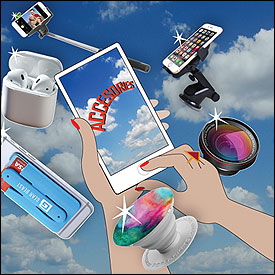
If you have ever encountered anyone below the age of 30 with a cell phone, then you know their primary goal is: SELFIES!!! Me being less than photogenic, I’m not a huge selfie-taker, but I do know some pretty sweet gear to make selfies a lot more fun to take. Most people are aware of selfie sticks, and there are some good ones out there like this one from Mpow (amzn.to/2ImaoAq), but why not take it to the next level? With the Selfly selfie drone (www.selfly.camera) you can finally get a hands-free shot of you and your fabulous friends.
A more common and compact selfie accessory is the ever popular Popsocket (popsockets.com). They’re compact, cheap, and easy-to-use. They do present a problem for people who mount their phones while driving for GPS use, etc. To solve that problem, they’ve come out with a nice car mount to go along with it, which is equally simple, cheap, and easy-to-use (bit.ly/2jIlQIs).
If you’re a bit more ambitious with your phone photography/videography, there are some nice options out there for you as well. Every generation of cell phone has better and better cameras, but if you want the best quality and versatility in your shots, consider getting some add-on lenses like the ones offered by Amir (bit.ly/2KNBPl8). If you’re the next Scorsese, but don’t have a multimillion dollar budget for your next film, consider an affordable, but high-end gimbal device like this one from DJI (bit.ly/2jFMC4g).
For any communication device, a close second to taking pictures of yourself is, of course, listening to music. With summer upon us, taking your music outdoors is more likely, so you’ll want something with plenty of range and durability to go along with good sound quality. Check out the JBL Waterproof Bluetooth speaker (amzn.to/2I1lCen) – it’s portable, affordable, and will keep the party going with a nice battery life. (You can even use it to charge your phone if your outdoor adventures make outlets scarce).
There are a ton of Bluetooth headphones out there, and while I typically try to recommend things that are made for both Android and Apple devices, the Apple AirPods (apple.com/airpods) are worth the investment if you’re an Apple fan. Their integration with the iPhone, iPad, and Apple Watch, combined with a small, sleek design, are really great. If you’re looking for a nice accessory to help you keep track of them while not in use, Catalyst offers a simple yet attractive waterproof case worth a look (bit.ly/2wpZF31).
Now if you’re not all about fun and games and need something geared more towards productivity, I have something for you as well. Mobile phones are powerful enough these days that with the right app suites, they can largely replace computers for your everyday needs. It can be tough to make that transition without the proper gear though.
Most smart TV’s will allow you to mirror your phone screen on them. If yours doesn’t, Roku (roku.com), Amazon’s Fire stick (amzn.to/2jI15Nk), and Chromecast (goo.gl/gjRcUG) are some inexpensive options that will allow you to do so. That doesn’t cover everything though, so you’ll want to consider adding a nice stand to maintain touchscreen access (amzn.to/2I97onO), and a portable keyboard (amzn.to/2jILYmw) to make inputting info easier.
All of this gear should be more than enough swag for your phone, and run you a lot less that the Louis Vuitton case you were eyeing. You might even have enough cash left over to get a nice thank-you gift for a helpful PropellerHead, eh?